Helper Functions and Program Logic
This page serves as a guide to the helper functions used within the programs generated by AutoaWeld, and the logic which these programs follow.
Program Logic
AutoaWeld utilises multiple essential helper functions that make up the core logic path of a verbotic's welding program. This logic path is illustrated below:
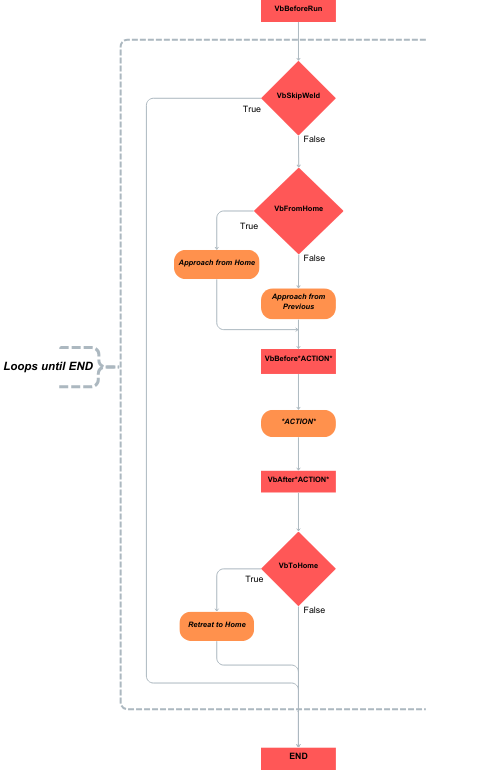
Program Logic Flowchartï
Note: ACTION represents either a welding or sensing motion. E.g. (VbAfterWeld)
Following the diagram above, the program heavily relies on the 3 essential boolean helper-functions to direct your programs path. These being VbSkipWeld, VbFromHome and VbToHome:
- VbSkipWeld: Allows the program to determine if the proceeding weld should be skipped or completed.
- VbFromHome: Informs the program whether the tool will be approaching the next action (e.g. sense, weld) from a home position, or from the previous position where it finished its last action.
- VbToHome: Allows the program determine if the robot can retain its current position, or if it needs to return to its set home position.
Note
A weld should only ever be skipped when the program has commanded the robot back to the home position. Skipping a weld from any other location will result in potential collisions.
In addition to these 3 decision-based helper functions, there are also several helper functions which complete specific processes at different points of the program:
- VbBeforeRun: Executes any additional code within the function before the start of the program and initialises robot-specific variables.
- VbAfterRun: Executes any additional code within the function after the end of the program.
- VbBeforeTouchSense: Executes any additional code within the function before starting a touch sense motion and sets the searchError flag to false.
- VbAfterTouchSense: Executes any additional code within the function after completing a touch sense motion and handles search errors if found.
- VbBeforeWeld: Executes any code within the function before the start of a welding motion.
- VbAfterWeld: Executes any code within the function after the end of a welding motion.
Examples
The following examples present several scenarios that may occur in your programs. The provided pseudocode on the left shows the steps the program follows, while on the right a diagram illustrates the logic path as the program advances.
Manual Weld Skip
This example demonstrates how to adjust your weld program to manually skip welds. In the diagrams and code below, you'll notice weld 2 is set to be skipped by changing the VbSkipWeld flag to True before the actions you wish to skip.

Manually Skipped Weld Example - Click image to expandâ¦ï
| 1. VbBeforeRun 2. VbSkipWeld = False 3. VbFromHome = True 4. Approach From Home 5. VbBeforeWeld 6. VbAfterWeld 7. VbToHome = False 8. VbSkipWeld = True 9. Weld 2 Skipped 10. VbSkipWeld = False 11. VbFromHome = False 12. VbBeforeWeld 13. VbAfterWeld 14. VbToHome = True 15. Return To Home 16. VbAfterRun 17. END |
Note
While the program above only consists of welding actions, if your program includes sensing actions, you can also skip these actions by setting the VbSkipWeld flag to True prior to each sense action.
Skip on Sense Error
For this example, the program detects an error during the sensing stage of weld 1. As a result, the program triggers a return home in order to skip weld 1 and advance to the sense 2.
This demonstrates how when an error is detected, the program will record the current WeldID that raised the error. This list of "Error" welds can be used to determine when the program needs to return home and skip the relevant weld.

Error Detected During Sense Example - Click image to expandâ¦ï
| 1. VbBeforeRun 2. VbSkipWeld = False 3. VbFromHome = True 4. Approach From Home 5. VbBeforeSense 6. Error Found 7. VbAfterSense 8. VbToHome = True 9. VbSkipWeld = True 10. Weld 1 Skipped 11. VbSkipWeld = False 12. VbFromHome = False 13. Approach From Home 14. VbBeforeSense 15. VbAfterSense 16. VbToHome = False 17. END |
Complete List of Helper Functions
Below is a list of the helper functions common across all robots. The naming below is based off the ABB robot naming convention, however for the the specific helper function names for your robot, see the relevant system integrator page for your robot.
| Helper Function Name | Definition | Use |
|---|---|---|
| VbBeforeRun | Executes any additional code within the function before the start of the program and initialises robot-specific variables | Add the code specific to your robot here, and any additional code you wish to execute prior to program start |
| VbAfterRun | Executes any additional code within the function after the end of the program | Include any additional code you wish to run after the welding program has completed here. |
| VbBeforeTouchSense | Executes any additional code within the function before starting a touch sense motion and sets the searchError flag to false. | Called prior to starting a touch sense motion, include any code relating to touch sense preparation or specific adjustments here. |
| VbAfterTouchSense | Executes any additional code within the function after completing a touch sense motion and handles search errors if found. | Called after a touch sense motion has been completed, in addition to the error detection and handling, can also run user-added code prior to error handling. |
| VbBeforeWeld | Executes any code within the function before the start of a welding motion | Called prior to a welding motion, add any specific welding operation adjustments or code here. |
| VbAfterWeld | Executes any code within the function after the end of a welding motion | Called after a welding motion, include any post-weld code in this procedure. |
| VbSkipWeld | Retrieves the weld data of the weld being skipped, if an error is detected for that weld then that weld is skipped. Otherwise, the weld is undertaken. Robot MUST be returned to home position before calling this procedure | Called at the start of every action to determine if the current weld is to be skipped. Should only ever be called when the robot is at the home position. |
| VbToHome | Returns the robot to the home position if a search error occurs, else the robot remains in its current position. | Is true when the robot should return home at the end of an action. For example, if the next weld is to be skipped. Called at the end of an action. |
| VbCutWire | Executes additional code related to cutting the robot wire, robot MUST be returned to home position before calling this procedure. | Called after the robot has returned to the home position and executes your robot's specific wire cutting code that is to be included in this procedure. |
| WbCleanTorch | Executes additional code related to cleaning the torch, robot MUST be returned to home position before calling this procedure. | Called after the robot has returned to the home position and executes your robot's specific torch cleaning code that is to be included in this procedure. |
| VbModifyToolData | Modifies the tool data using the extra code added to this procedure. | Optional: Include any tool data modifications in this function to return an updated tool with the new data. |
| VbModifyWObjData | Modifies the wobjdata using the extra code added to this procedure. | Optional: Include any desired adjustments to the work object data in this function to return an updated wobj to the program. |
| VbSearchL | Conducts the robots search motion using touch sense in order to return an updated offset for increased accuracy. | Called whenever a sensing motion is required, allows program to retrieve an updated offset to be used when welding. Uses touch-sense to complete this. |
| VbLaserSearchL | Conducts the robots search motion using laser sense in order to return an updated offset for increased accuracy. | Called whenever a sensing motion is required, allows program to retrieve an updated offset to be used when welding. Uses laser-sense to complete this. |